• Release notes
  • Knowledge Base
  • Request Support
  • Release notes
  • Knowledge Base
  • Request Support
home/Knowledge Base/Tricorn/Static Data/Suppliers/Locations
Popular Search:

Locations

21 views 0

The location subtab records all addresses relevant to this customer, the address added in the Supplier Address section will automatically be displayed. Select the default tick to identify this as the main address.

To add additional address under the same account reference, select the + at the bottom of the page the edit address window will open.
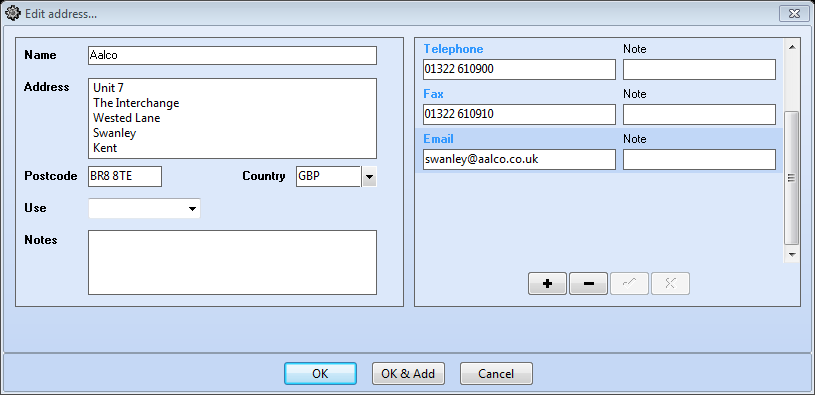
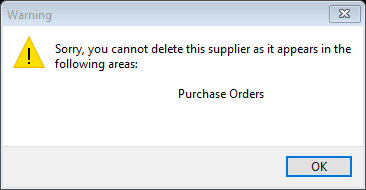
To create further addresses whilst in this same window, select the OK & Add button, a blank Edit Address window will appear, insert all relevant address/contact as before. To delete address details, select – the delete button. Please Note: if the address has any records using this detail it is not advisable to delete the record.
Was this helpful?

Yes  No
Related Articles
  • Sub Con Supplied
  • Materials Supplied
  • Parts Supplied
  • Purchase Orders
  • Contacts
  • Document Links
Suppliers
  • Locations
  • Sub Con Supplied
  • Materials Supplied
  • Parts Supplied
  • Purchase Orders
  • Contacts
  • Document Links
  • Account Status
  • Supplier Address
  • Suppliers
Sitemap
  • Release notes
  • Knowledge Base
  • Request Support
Find Us

Fusion Hive, North Shore Innovation Centre, North Shore Road, Stockton on Tees, TS18 2NB

Search
  • Privacy Policy
  • Terms of Use
Popular Search: