Manual entry is used to insert stock items after an initial stocktake when Tricorn is first used or during periodic stocktaking sessions.
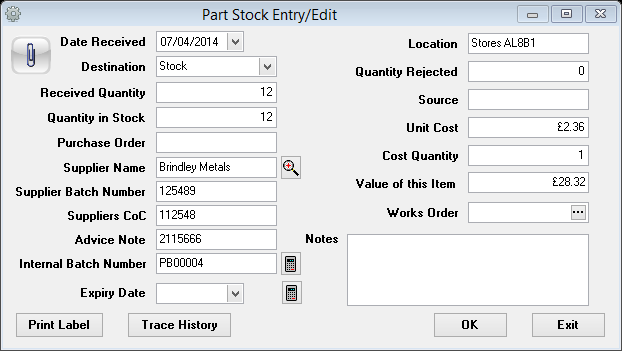
Date Received – Use the date picker to insert date stock has been received
Destination – Select either Stock or Quarantine from the drop down box
Received Quantity – Insert quantity received
Quantity in Stock – Insert quantity in stock
Purchase Order – Insert purchase order detail from previous systems or cross reference to Tricorn
Supplier Name – Use the looking glass search button to enter the customer name
Supplier Batch Number – Enter the supplier batch number detail
Supplier CoC – Enter the supplier CoC number detail
Advice Note – Enter the supplier advice note detail
Internal Batch Number – Use the calculator button to enter the next internal batch number sourced from the reference number stack
Expiry Date – Enter the expiry date if applicable
Location – Enter location details
Quantity Rejected – Enter quantity of rejected stock
Source – Enter how this stock item was sourced
Unit Cost – Enter the unit cost
Cost Quantity – Enter the cost quantity
Value of this Item – Automatically populated from the unit cost and the amount in stock
Works Order – If linked to a Tricorn works order can be cross referenced using the search button within the field
Notes – Enter additional notes for this stock item, these notes will appear on the part batch picking list