Materials screen records details relating to the materials database, this can include the cost of the material with per quantity, any uplift to be included and if reselling material a minimum selling price with an indicated target selling price. Stock levels are recorded by each individual batch, a stock report can be produced, usage display against works orders, manual entry of stock and minimum, replenish and maximum stock quantities.
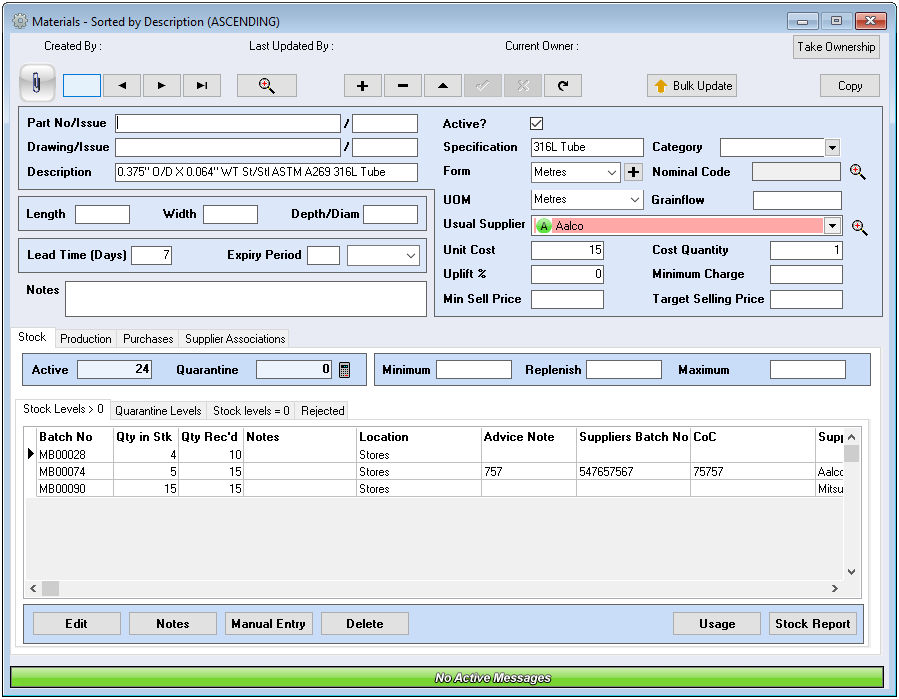
Drawing/Part Details (Number and Issue) – These fields are normally used to record if the material is held for a specific drawing or part
Description – Description of the material; it is recommended when creating any database a common format is adopted for ease of information retrieval and unnecessary duplications. The description is used on purchase orders, therefore it is important to ensure the information is as per the suppliers detail.
Specification – Insert a common specification for this material that can be used within the search window
Category – Materials can be assigned a category for searching/reporting purposes, this is setup within Tools – Setup – Options/Checks – Material/Parts – Stock Category Maintenance. Refer to Navigation – Setup – Options/Checks
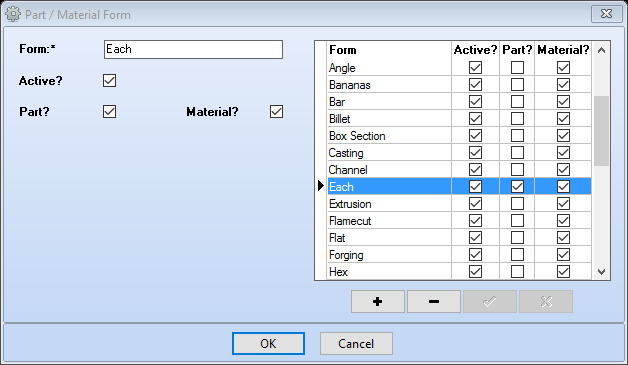
Form – This is the form of the material e.g. billet, bar etc; the material is purchased in, the drop down menu provides a list of common ‘Forms’, it is possible to type a different form if not displayed, however this is not self-learning and will require input each time.Form + use the + button to add new forms as required. Select the + button, insert form description, tick Active, tick Part or Material as relevant.
Unit of Measure (UOM) – Enter the unit of measure to be displayed on quotations and works orders, this is the measure used for calculating how much material is required. It is possible to type a different UOM into the drop down selection list, however this is not self-learning and will require input each time.
Nominal Code – Nominal code assigned to materials, these are setup in Financial
Grainflow – If applicable enter the value
Usual Supplier – Usual supplier for this material, this will be displayed when selecting the material in either quotations or works orders.
Unit Cost – Enter the cost of the material, this cost is used to calculate material stock value. Please Note: this is a static figure and requires maintenance when the cost of the material changes.
Cost Quantity – Enter the quantity the cost applies to e.g. cost for 1, cost for 5
Uplift % – Default uplift for the material; this will be copied to quotes and works orders when the material is selected, unless overwritten it will be used in calculations
Min Sell Price – If the material is to be sold to another party, this field is used to indicate the minimum price to sell
Minimum Charge – Records a minimum charge can be applied; this can be used as a reference field by clients as Tricorn does not use the field in any process
Target Selling Price – If the material is to be sold to a third party this field is used to indicate the target selling price
Length – Additional measurement of material
Width – Additional measurement of material
Depth – Additional measurement of material
Lead Time (Days) – Supplier lead time recorded in days
Expiry Period – When entering an expiry date (during the booking in process of materials), this and the following field will allow auto population of days/months. Enter the number of days/months in the first field, then in the following field a drop down will display with Days/Months
Notes – Used to record any additional information related to this material